Complete website
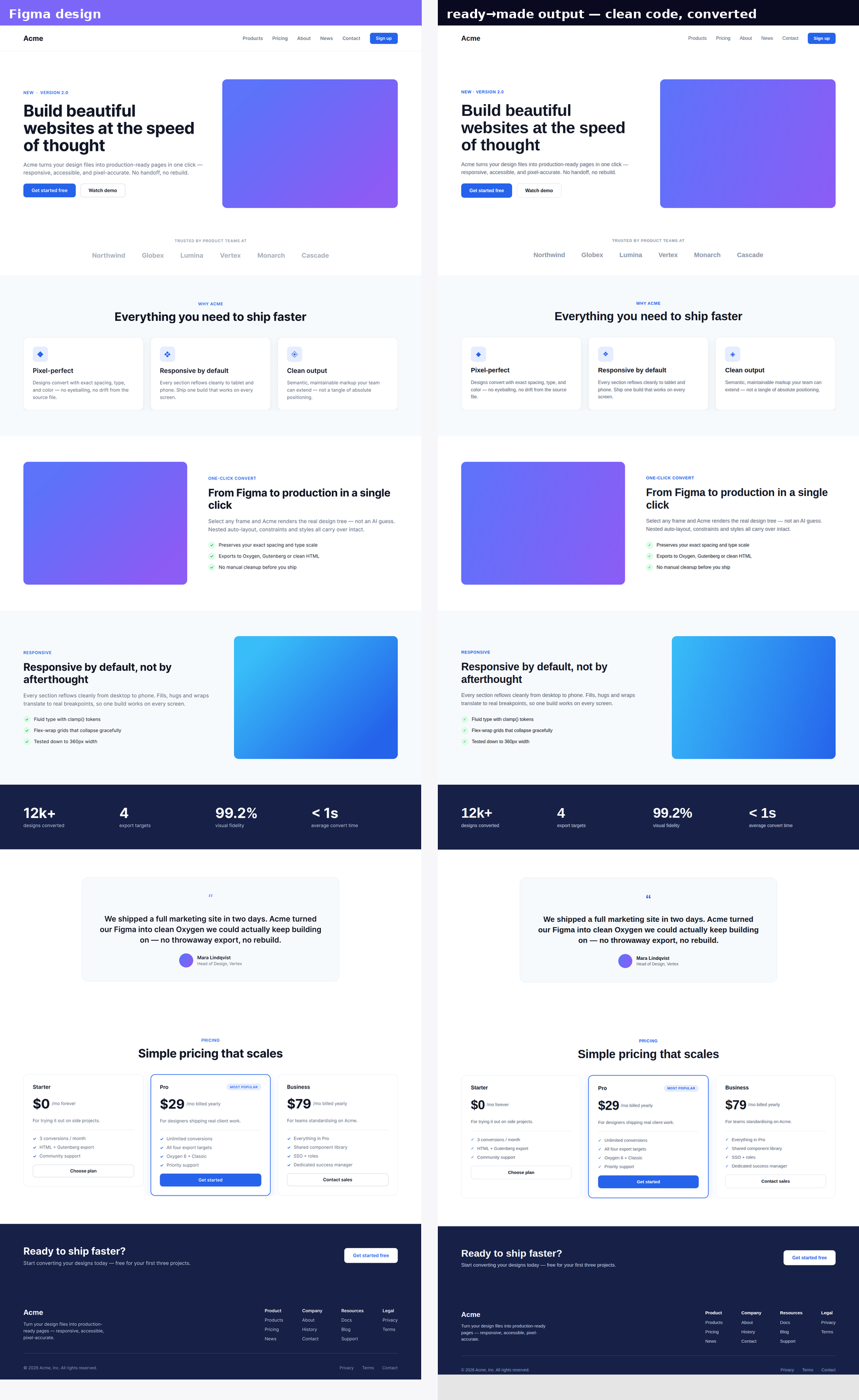
A complete, multi-page website — the Acme design system — converted end to end with ready→made. Below is the Home page: a real Figma frame, converted to clean code at 96% visual fidelity. This is the happy path, start to finish.
🎁 Follow along with the real file — duplicate the ready→made Example Website on Figma Community (Home, Products, Pricing, Contact, About, History, News) and convert it yourself.
The happy path
- Select in Figma. Open ready→made and select the page frame (here, the Home page — built with clean auto-layout, shared components and named styles).
- Pick a target. Oxygen Classic, Oxygen 6, Gutenberg or HTML — one engine, four outputs.
- Convert. The spatial engine reconstructs real flex/grid, sections, gradients and type — deterministically, no AI guessing.
- Paste or download & ship. Oxygen Classic: open the Import dialogue (Ctrl/Cmd+Shift+I) and paste the JSON — see Convert to Oxygen Classic. Oxygen 6: paste via the integration plugin. Or take the HTML and hand it to your AI for the last 10%.
Design in, code out
The Figma design on the left, ready→made's converted output on the right — the whole page: hero with gradient, three feature cards, the stats band, testimonial, the three-tier pricing table and footer, all reproduced.
Four targets, one conversion
The same Home page emits all four outputs. The blocks below are readable summaries — Copy puts the full, paste-ready file on your clipboard.
HTML & CSS
<section class="hero">
  <div class="hero__text">
    <p class="eyebrow">New · Version 2.0</p>
    <h1>Build beautiful websites at the speed of thought</h1>
    <div class="hero__cta"><a class="btn btn--primary">Get started free</a>…</div>
  </div>
  <div class="hero__art"></div>   <!-- gradient block -->
</section>
<!-- semantic sections, deduplicated class CSS, clamp() type — full file on Copy -->
Gutenberg
<!-- wp:group {"layout":{"type":"constrained"}} -->
<div class="wp-block-group">
  <!-- wp:heading {"level":1} --><h1>Build beautiful websites…</h1><!-- /wp:heading -->
  <!-- wp:buttons -->…<!-- /wp:buttons -->
</div>
<!-- /wp:group -->   <!-- 222 native blocks, valid — full file on Copy -->
Oxygen Classic
ct_section  › ct_div_block .hero
                ├─ ct_div_block .hero__text  (h1 + paragraph + buttons)
                └─ ct_div_block .hero__art   (linear-gradient)
              › ct_section .features  (3 × ct_div_block .card)
              › …  // 222 components — Copy gives the paste-ready .oxygen.json
Oxygen 6
tree:  Container(.hero) › [ Container(.hero__text), Container(.hero__art) ]
class .card:
  breakpoint_base            → 3-col grid, gap 24px
  breakpoint_phone           → stacks to 1 column
// 222 nodes, 98 per-breakpoint selectors — full .oxygen6.json on Copy
Then keep building
Every element pastes into Oxygen as a native, editable element — see exactly how in the Card grid example. Or hand the clean HTML to your AI to wire up content and interactions — see Finishing with AI.