Convert to Oxygen 6
Oxygen 6 is a ground-up rebuild of the builder. ready→made emits output structured for its new engine — for fresh builds and migrations.
Before you start
Install the free Ready-Made Oxygen Integration plugin (Plugins → Add New or wordpress.org). It adds an import screen under Settings → readymade Import where you paste the output. (Oxygen Classic doesn't need it — it has a built-in Import dialogue.)
Steps
- Select your frame in Figma, open ready→made, choose Oxygen 6 and Copy the output.
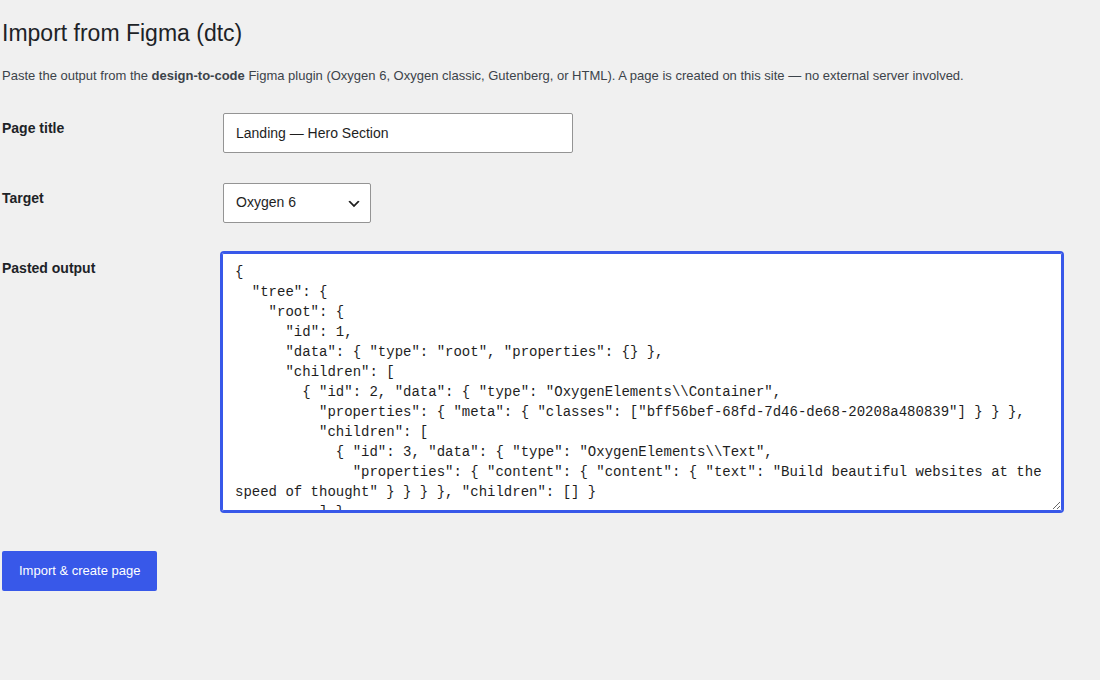
- In WordPress, go to Settings → readymade Import — the "Import from Figma" screen.
- Give the page a title, set Target to Oxygen 6, and paste the output into the box.
- Click Import & create page. The plugin writes the tree to Oxygen 6, merges your design classes into Oxygen's global selectors, regenerates the CSS, and opens the page fully styled in the builder.
How it differs from Classic
Oxygen 6 separates structure (the element tree) from styling (per-class, per-breakpoint selectors). ready→made emits both: a clean tree of typed elements, and matching class definitions with responsive breakpoints already filled in.
- Typed elements — Container, Image, Text and friends, mirroring your Figma structure.
- Per-breakpoint styles — a base style plus tablet/phone overrides, so the responsive behaviour is native to the builder rather than bolted on.
On an older site? Convert to Oxygen Classic instead — it pastes straight into the 4.x builder.