Semantic HTML From a Design, Not Div Soup
 Philipp Gappmaier
August 26, 2026
Philipp Gappmaier
August 26, 2026 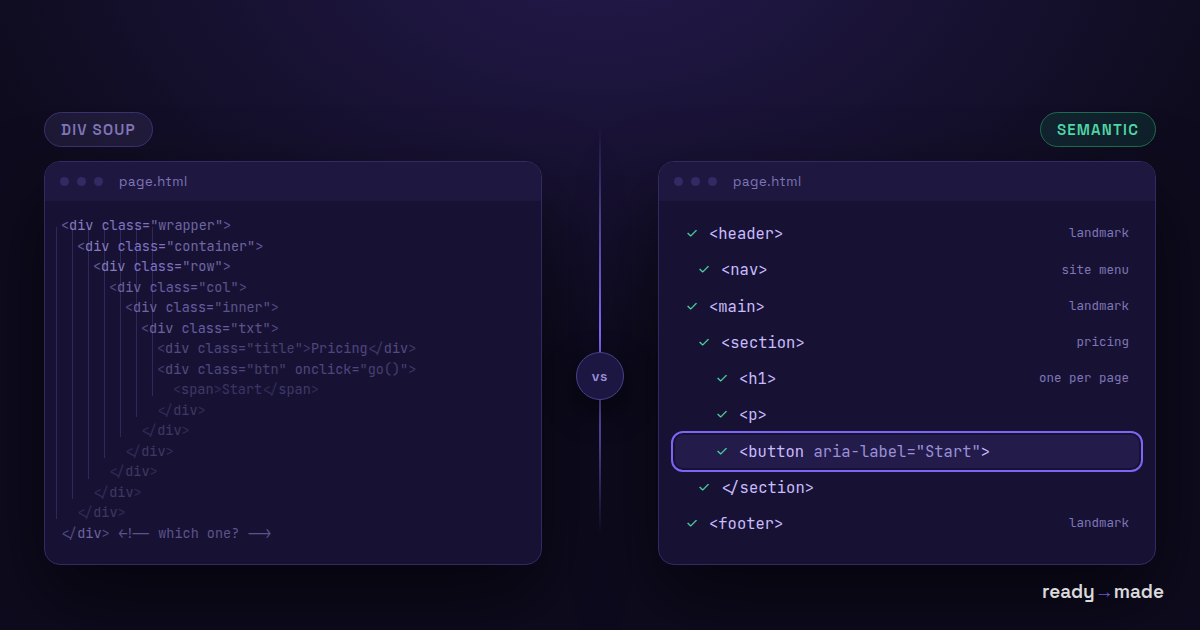
Ask a language model to turn a design into code and you will usually get something that looks right. Open the markup and you often find the same thing underneath: <div> inside <div> inside <div>, six levels deep, every one of them meaningless to a screen reader, a search engine or the next developer.
It renders correctly. That is not the same as being correct.
What div soup actually costs you
The visual result can be pixel-perfect while the document is unusable in four specific ways.
Screen readers lose the map
Assistive technology navigates by landmarks and headings. A blind user typically jumps between headings to scan a page, exactly the way a sighted user runs their eye down it. If your page is one long chain of generic containers, there are no landmarks to jump to and no outline to scan. The content is technically present and practically unreachable.
A <nav> announces itself as navigation. A <div class="nav"> announces nothing at all.
Keyboards stop working
A <button> is focusable, activates on Enter and Space, and reports itself as a button. A <div onclick> styled to look like a button does none of that unless someone remembered to add a tabindex, a role, and key handlers. Usually nobody did.
This is the single most common accessibility defect in generated markup, and it locks out everyone who does not use a mouse.
Search engines read structure, not screenshots
Heading hierarchy is how a crawler works out what a page is about and which parts matter. Text that only looks like a heading because it is 32px and bold is, to a parser, just text. You lose the structural signal that tells search engines and AI answer engines which passage answers which question.
The next developer inherits a maze
Six months later, somebody has to change the pricing section. In semantic markup they search for <section class="pricing"> and find it. In div soup they count nesting levels in the inspector. That cost is real, recurring, and paid by whoever comes after.
Why generated markup drifts this way
It is not carelessness. It is a consequence of how the generation works.
A model producing code from a screenshot or a design file is predicting plausible markup. A <div> is always plausible. It is never wrong in the sense of failing to render, so it is the safe token to emit at every level of nesting. Choosing <nav> over <div> requires a judgment about what that group of links means, and meaning is precisely what a screenshot does not contain.
Run the same prompt twice and you will often get different structure both times. That variance is fine for prose. It is expensive for markup that has to be maintained.
What semantic output looks like instead
The same page, expressed as a document rather than a pile of boxes:
<header>,<nav>,<main>,<footer>for the page skeleton, so landmark navigation works out of the box.- One
<h1>, then<h2>and<h3>in a hierarchy that does not skip levels, so the outline is real. <button>for things that do something,<a href>for things that go somewhere. This distinction matters more than any other single choice.<ul>for lists, so assistive tech can announce "list, six items" instead of reading six unrelated lines.<section>and<article>where a grouping genuinely is one, not everywhere.- Real
alttext on content images, and emptyalton decorative ones so they are skipped rather than described.
None of this is exotic. It is the HTML that has been correct since 2011. The difficulty is not knowing the tags, it is producing them consistently under deadline.
Deterministic conversion, and where it helps
Our engine converts designs and HTML into WordPress structure without asking a model to guess. It reads real geometry and real CSS, resolves the cascade the way a browser does, and maps what it finds onto the target's native elements. Same input, same output, every time.
Being honest about the boundary, because it matters here: geometry tells you a group of links sits in a row at the top of the page. It does not tell you the author considered that group the primary navigation. Structural intent that exists only in a designer's head cannot be recovered from pixels by any tool, ours included.
What determinism does buy you is worth being precise about:
- Headings stay headings. A heading in the source becomes a heading widget with a real level, not a styled text block.
- Buttons stay buttons. An anchor styled as a button maps to a native button element with its link intact, so focus and keyboard behavior come along.
- Lists stay lists. Structure is preserved rather than flattened into positioned text.
- Nesting matches the source. No invented wrapper layers. If your input is clean, the output is clean.
- It is repeatable. Convert the same file next month and you get the same document, so you can fix an input once and trust every future run.
The practical consequence: garbage in still means garbage out, but good markup in reliably means good markup out. That is not true of a system that re-improvises every time you ask.
A short checklist before you ship generated markup
Whatever produced your code, these five checks take about two minutes and catch most of the damage.
- Tab through the page. Every interactive element should receive focus, in a sensible order, with a visible focus ring. If something you can click cannot be reached by keyboard, it is broken.
- Check the heading outline. Any browser extension that lists headings will do. One
h1, no skipped levels, and the list should read like a table of contents. - Search the markup for
onclickon a div. Each one is a button that is not a button. - Look for landmarks. If
<main>and<nav>do not appear anywhere, screen reader users have no shortcuts. - Run an automated pass. An axe or Lighthouse audit catches contrast and missing alt text cheaply. It will not catch everything, so do the keyboard pass too.
None of this makes a page accessible on its own. It removes the failures that never needed to happen.
FAQ
Is div soup actually an accessibility violation?
Non-semantic containers are not illegal by themselves. What fails audits is what tends to travel with them: unreachable controls, missing landmarks, no heading structure, and click handlers on elements that cannot receive focus. Those map directly onto WCAG failures.
Can AI produce semantic HTML if I just ask for it?
Often, yes, and it has improved a lot. The issue is consistency rather than capability. The same prompt can produce a clean document once and a nest of wrappers the next time, so you have to verify every output rather than trust the process.
Does semantic HTML help SEO?
Indirectly but genuinely. Heading hierarchy and landmarks help crawlers understand structure and extract passages, which matters more as AI answer engines quote passages rather than whole pages. It is not a ranking trick; it is being legible.
What about ARIA?
Use it only where native HTML cannot express what you need. The first rule of ARIA is not to use ARIA: a real <button> beats a div with role="button" every time, because the native element brings behavior and not just a label.
Does your converter guarantee accessible output?
No, and be sceptical of any tool that claims it does. We preserve the structure and semantics present in your input rather than flattening them, and we do it repeatably. Whether the result is accessible still depends on the input and on your review.
My design was made in Figma. Does that carry structure?
Partly. Frames, auto-layout and naming carry real signal, and a well-organised file converts noticeably better than a loose one. Intent that was never expressed in the file cannot be recovered from it.
See what clean conversion looks like → wpconverters.com/figma-to-html Free, runs in your browser, no signup.