Divi to Elementor: Migrate Without Rebuilding (Free Converter)

If a client hands you a Divi site and asks for Elementor, you have two well-known options. Rebuild every page by hand, or pay a migration service. The services are real and busy: providers openly charge from around $40 per page, and full-site quotes climb fast from there. For a 25-page site, "just pay someone" is a four-figure decision for work that is, in large part, mechanical.
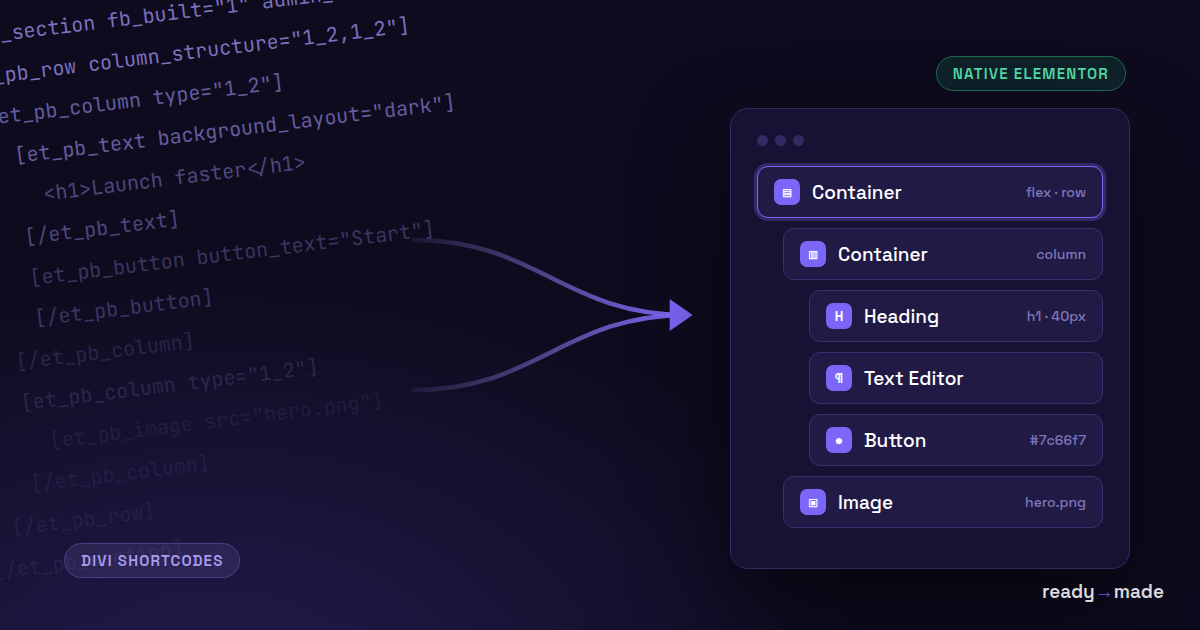
There is now a third option. We built a free converter that reads Divi's own export format and produces native Elementor structure you paste straight into the editor. Not an embedded HTML blob: real sections, columns and widgets you keep editing like anything you built yourself.
Try the free Divi → Elementor converter → wpconverters.com/divi-to-elementor
Why people are leaving Divi right now
Three reasons come up again and again.
The Divi 5 transition. Divi 5 is a ground-up rewrite of the builder, and big rewrites make agencies re-evaluate. If you are going to relearn a builder anyway, some teams take the moment to consolidate on the ecosystem with the largest market share instead. By install counts, Elementor's base is more than twice Divi's, and the gap is growing.
Shortcode lock-in. Divi 4 stores every layout as nested [et_pb_*] shortcodes. Deactivate the theme and your content becomes a wall of bracket soup. That single experience converts more people than any feature comparison.
Client and hiring pressure. More freelancers know Elementor, more clients ask for it, and more addon vendors target it first. None of this makes Divi a bad builder. It makes migrations a routine job that deserves routine tooling.
What Divi to Elementor migration costs
| Approach | Cost | Time | What you get |
|---|---|---|---|
| Manual rebuild | Your hours | Half a day to a full day per page | Highest fidelity, soul-crushing repetition |
| Migration service | From ~$40 per page; full sites into the thousands | Days to weeks | Done for you, priced per page |
| Free converter + cleanup | $0 | Minutes per page, plus targeted cleanup | The mechanical 80% automated, you finish the rest deliberately |
The honest framing: no tool converts every Divi module perfectly, ours included. What a converter does is automate the deterministic part. Structure, columns, text, colors, spacing. Then you spend your time on the parts that genuinely need judgment.
How the free converter works
Three steps, and you never need Divi installed on the destination site. You do not even need an active Divi license to convert an export someone hands you.
1. Export from the Divi Library
In WP admin on the Divi site: Divi → Divi Library → Import & Export → Export. You get a .json file. Page-level exports from the builder work too. If all you have is raw shortcode content from the database or the Text editor view, paste that instead. The converter accepts both formats.
2. Paste and convert
Open the converter, paste the file contents, hit Convert. Everything runs in your browser. You get Elementor paste-JSON plus a conversion report that tells you exactly what mapped and what did not. No signup, no upload of your content to anyone's server.
3. Paste into Elementor
Copy the output, open your Elementor page, right-click the canvas and choose Paste. If Elementor asks for clipboard permission, allow it. The structure appears as native, editable elements. Works with free Elementor; Pro is not required.
What survives the conversion
- Structure: sections, rows and columns become native Elementor sections and columns, including mixed widths like 1/3 + 2/3.
- Text and typography: headings and text with families, weights, sizes, colors, uppercase transforms.
- Backgrounds: solid colors and Divi gradients, mapped to Elementor's native gradient controls. Sections marked as dark layouts keep their light text.
- Global colors: Divi's global color references resolve to their real values.
- Images: images embedded in the export come along, inlined into the output up to a size budget. Larger ones keep their URLs and get listed in the report.
- Common modules: buttons, blurbs, heroes (fullwidth headers), testimonials, pricing tables, team members, counters, dividers.
What does not survive (yet)
- Forms: Divi contact forms and signup modules arrive as styled placeholders. You rebuild those with your form plugin of choice. This is deliberate; silently faking a form would be worse.
- Dynamic content: blog grids, shop modules and portfolio loops need their Elementor equivalents wired to your actual content.
- Animations and interactions: entrance animations are dropped.
- Anything exotic: unknown modules are preserved as HTML where they have content, and every one of them is named in the conversion report. Nothing disappears silently.
What about Divi to Elementor plugins?
A small plugin ecosystem is emerging, with free versions limited to single layouts and paid tiers around $49 per year for batch features. Worth a look if you migrate Divi sites weekly. If you migrate occasionally, a free browser tool with no install covers the same ground.
FAQ
Do I need Divi installed to use this?
No. The converter reads the export file. Any Divi site can produce one, and conversion happens entirely in your browser.
Does it work with free Elementor?
Yes. The output uses containers and widgets available in the free version.
Will it be pixel-perfect?
No converter is. Expect a faithful, editable starting point: correct structure, text, colors and images, with a report listing everything that needs your attention.
What about Divi 5 layouts?
Divi 5 introduces a new format. The converter currently reads the Divi 4 shortcode format, which is also what Divi 5 sites can still export for legacy layouts. Divi 5 native support is on the roadmap.
Convert your first page now → wpconverters.com/divi-to-elementor Free, no signup. If something converts badly, use the feedback button in the tool. We ship fixes weekly.